Making a file with no extension acccessible on IIS

We were doing some tests and as part of one of the tests, we had to access a file which was hosted on a server running IIS 6.0. The program was making a http Get request and was getting 404. Yeah, the fabulous 404 error. What was really happening was that server was returning 404 for all files which has no extension.

We searched around and asked local experts and almost everyone could tell us on how to add a file extension but almost every one had no clue on how to add a Mime type with no extension. We tried many crazy things.

So we searched and searched and finally were able to get past. Since it took some time for us to find a relevant info on web, I thought that I would write a small post on this. So here’s what you need to do.

Go to IIS, then Server name and then the domain name where you need to make a file accessible with no extension. Click ‘Properties’ and go to ‘HTTP Headers’ and then click [Mime Types]. I am not giving step by step as I am assuming that you would be able to figure this out.

Now comes the real part. In the ‘Mime Types’ dialog, click [New]. You would get following.
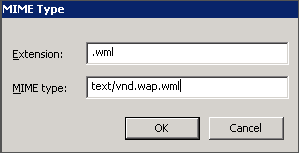
Enter the following information:

* Extension - *
* MIME type - application/octet-stream

Remember the screen-shot has some other extension. Just ignore that and enter ‘*’ for file type and application/octet-stream for MIME type and you are good. Hope this information is useful for you.

How to create a optimized testbed-configuration matrix

When we code a software, we choose an IDE which typically runs on an OS of a specific locale, having some Service Pack, co-existing with some software and so on. We compile the code and choose relevant targets, the compiler spits a binary and your job as a coder is done. In a complex world, there would be a build system which would get all the relevant files from relevant branches , from a source code control system , compile them and trigger the installer scripts. Installer script would create a package out of it. And its done.

When the package reaches the software tester, he has a big problem to solve. The first question which he has to answer that whether he should install the s/w on a fresh clean OS which has been installed just now, warm and inviting. OR he should rather install it on a dirty OS which has a plethora of software and would be more close to end-user. The answer is simple, do both.

The task doesn’t finish there, now comes the question about

* Which operating system, since it runs on all Windows. So should I install and make a clone of myself so that all of my clones can do simultaneous testing. To give you an example, MS Word runs on Windows and MAC. Within windows, it runs on Windows XP, Windows Vista and Windows 2000 and some other less popular flavors as well. Within Windows XP, it runs on all flavors of XP viz. SE, MCE, Professional. Win 2K has many more flavors and with Win Vista you need to do a MS certification to really say with surety on how many flavors it has. I am yet to talk about ‘Service Packs’.

You ask this question to a non-software-tester group head and he would say ‘Do it on All’.
Continue reading “How to create a optimized testbed-configuration matrix”

Setting a meaningful WP sender e-mail

I have a blog which is hosted on WordPress. Its a travel blog and I wanted that Authors be notified when a new comment is made on any of their posts. So I did the relevant settings but funnily the sender e-mail id is host#.hostmonster.com. I have taken the hosting from Hostmonster.com.

This was my first experience with a website so I sort of let it go. Once the site was old and I had more information and time, I started looking for a solution. I found the solution here

http://riteshsapra.net/wp/2008/06/05/wordpress-sender-email-incorrect-hostmonster/

and it worked. In a nutshell the solution is
1. Look for a file called php.ini. Its usually on the root
2. Look for a following command and add -f option followed by e-mail id.

sendmail_path = /usr/sbin/sendmail -t -i -fusername@domain.com

3. Copy this file to WP blog root.

You need to ensure that the e-mail id which you are using is correctly configured in cpanel.

This did solve the initial problem. Now users were getting e-mail from a relevant id. But still it was not looking very elegant as there was no sender name. I wanted to see if there could be a way where I can set a ‘Sender’ name instead of an e-mail ID.

I asked Ritesh and he was not aware so I did some research and buoyed by the initial success after Reading Ritesh’s article, I found a solution.

I did following

sendmail_path = /usr/sbin/sendmail -t -i -fusername@domain.com -FfromGhumakkar

I was expecting that it would set the Sender name as ‘From Ghumakkar’ but WP actually now setting the real commenter as the sender, which is all the good.

If its useful to you then do write a small comment.

What is Virtual Lab Automation and why should I care?

My name is Srihari Palangala, and I work at VMLogix as a manager of product marketing. I have spent several years in the software technology industry under various capacities – software development/testing, IT consulting, business development and marketing.

I’m sure readers of this blog are passionate about software testing, verification, validation and the like. I do believe that software testing plays a critical role in ensuring that IT infrastructure operates 24 X 7 and with minimum/no activity disruption. IT is viewed as a core infrastructure today and any adverse impact is directly reflected in the business top and/or bottom lines. Unfortunately, software continues to be somewhat unreliable and this is probably what causes some IT folks to whine! (btw, I’m not endorsing the view in the referenced post). My point is — Solid and reliable IT performance is only possible with sound testing processes and practices.

However, the job of testing has become increasingly difficult over the years – with increasing software complexity, hardware and software platforms, third party applications and so on. The permutations and combinations to test are just mind boggling. This becomes even harder with shrinking IT budgets and globally distributed teams developing software today. I don’t need to belabor the point here, all of you I’m sure resonate with this – since these are your operational challenges on the job!

Continue reading “What is Virtual Lab Automation and why should I care?”

‘Code Coverage’ – How does it help in testing ?

The million dollar question which every Manager asks to testing teams is that ‘Whether they have executed all the test cases ? “. If you are a software test practitioner, you would be feeling really frustrated. How on earth, can you ever execute all the ‘Test Cases’ for a particular feature.

Well, there is no silver bullet but there is a way which you can use to get a good enough answer for the above question. Its called ‘Code Coverage’ analysis.

How does it work
There are certain software tools in the market which can be used to do ‘Code Coverage’. One of the popular software is ‘Bullseye’. The process is simple. While building binaries for your software program, configure ‘Bullseye’ with the IDE. When binaries are made, bullseye inserts some of its own signatures. This is called ‘Instrumentation’ of the code.

Continue reading “‘Code Coverage’ – How does it help in testing ?”