Has it ever happened to you that right after you published your story, a new one slided in , almost in no time. The temptation of seeing your work in print is hard to resist. Ghumakkar displays stories on its home page based on time of publishing, so a recent story would be featured on top, though we have enough feedback to suggest that we should let Ghumakkar editors control the top of the shelf space. While internally we debate more on this, here’s a small step-by-step which might work, if all of us try to follow this.
Essentially, what you can do is that you can ‘schedule’ your posts to a future date. A small calendar would help you to quickly scan for ‘free dates’ (it sounds like an oxymoron, free dates) and if you (and everyone else) pick a date which is not already taken, then your story would get top-of-the-shelf for probably one full day.
1. After you are done with writing, take a look at the calendar. This is on your right.
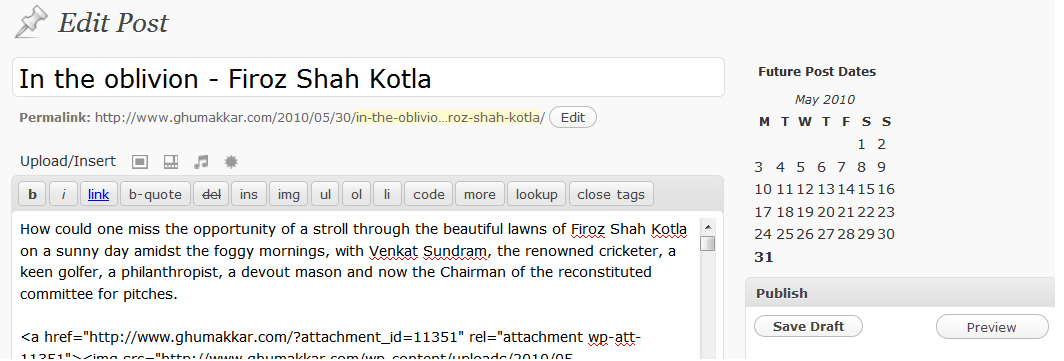
2. This calendar shows you the dates in green, these are the days on which a post is already scheduled. Do not pick them. Once you find a date, then instead of clicking ‘publish’ button, click ‘Edit’ adjacent to ‘Publish Immediately’. Choose a future day and time. In the below example, I chose June 02, 2010 at 0600 hrs.
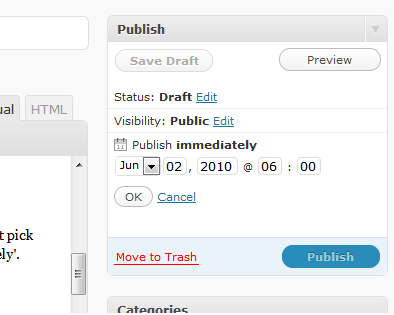
3. As you press OK, you would notice that [Publish] button has changed to [Schedule]. Click it.
The calendar is just an added convenience, the feature to schedule your stories was there all the time. The Calendar helps you quickly scan the ‘free dates’. One other way to look at currently scheduled stories is to click at ‘Scheduled’ after you are in ‘Posts’ views/
A post could be one of the following viz Published, Scheduled, Drafts, Trash.
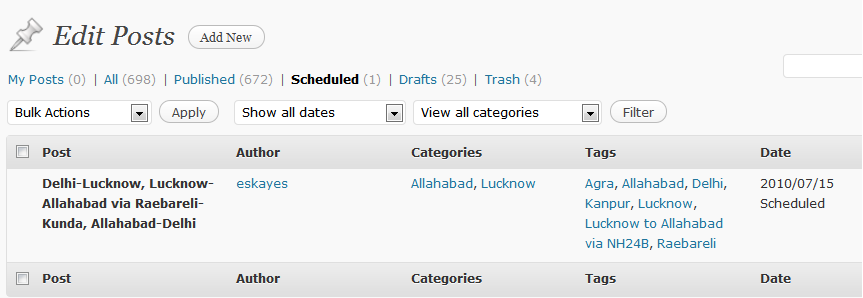
Click on image above to see it in big size
You should be able to look at currently scheduled posts by clicking on ‘Scheduled’.
Typically Ghumakkar doesn’t get more than one post every day, so if we all choose a free day, we get more time at the top of the page. And if you do not find anything scheduled for today and the last story is been there for at least a day, go for instant Nirvana and click [Publish]